
Release Notes 34.10.0
This release focuses on strengthening security, governance, and operational performance across the platform. Key updates include system-wide security upgrades, improved Marker-Checker workflows for better visibility and control, and enhanced Live Chat capabilities with real-time analytics and more reliable agent interactions. Content management is improved with history tracking and browser-based conditions, while WhatsApp delivery tracking enables real-time monitoring and faster issue resolution. Performance optimizations also reduce system load and improve stability, alongside multiple bug fixes to enhance overall reliability and user experience.
New features and enhancements#
Upgraded components and resolved security vulnerabilities#
#KR-8414, #enhancement, #security
Performed system-wide upgrades to key components and dependencies to address identified security vulnerabilities and improve overall platform stability. This includes applying security patches, updating libraries to supported versions, and strengthening configurations to align with best practices. These improvements reduce potential security risks while ensuring better performance, maintainability, and long-term reliability of the platform.
Improved visibility of submitted changes for non-approver editors#
#KR-9707, #enhancement, #marker-checker
Updated the Editor module to allow users without “editor approve” permissions to view the changes they have submitted for approval. Previously, only users with approval rights could view all pending and completed tasks, while editors without approval access were unable to track their own submissions.
With this enhancement:
- Editors can now submit changes and view their own pending and completed tasks, but cannot approve or reject them
- Editor Approvers retain full access to submit, approve/reject, and view all tasks across users
This update improves transparency and accountability, allowing contributors to track their submissions without expanding approval permissions, and reduces the risk of accidental bulk approvals.
Added browser detection as a condition in Content Nodes#
#KR-9696, #enhancement, #editor, #contente-node, #browser
Introduced the ability to capture the user’s browser and use it as a condition within Content Nodes. This allows clients to design more adaptive flows based on browser capabilities, ensuring that users are guided through compatible journeys. With this enhancement, clients can avoid unsupported scenarios, reduce reliance on complex workarounds or integrations, and deliver more reliable, browser-specific experiences.
Added history view for Content Nodes in the Editor module#
#KR-7863, #enhancement, #editor, #content-node, #history
Introduced a history tracking capability for Content Nodes within the Editor module. Every time a content node is edited and saved, the changes are now recorded in a history log. Users can view the full change history of a content node, including details such as who created or modified it and when the changes were made. This enhancement improves traceability, accountability, and version visibility for content management.
Introduced the Live Analytics tab in the Supervisor module for real-time chat monitoring#
#KR-7272, #feature, #supervisor, #analytic
Added a new Live Analytics tab within the Supervisor module to provide real-time visibility into live chat operations. This dashboard gives supervisors an at-a-glance view of key metrics, including total chats (resolved and abandoned), active agents (engaged and available), queue length (in progress and waiting), and average wait time.
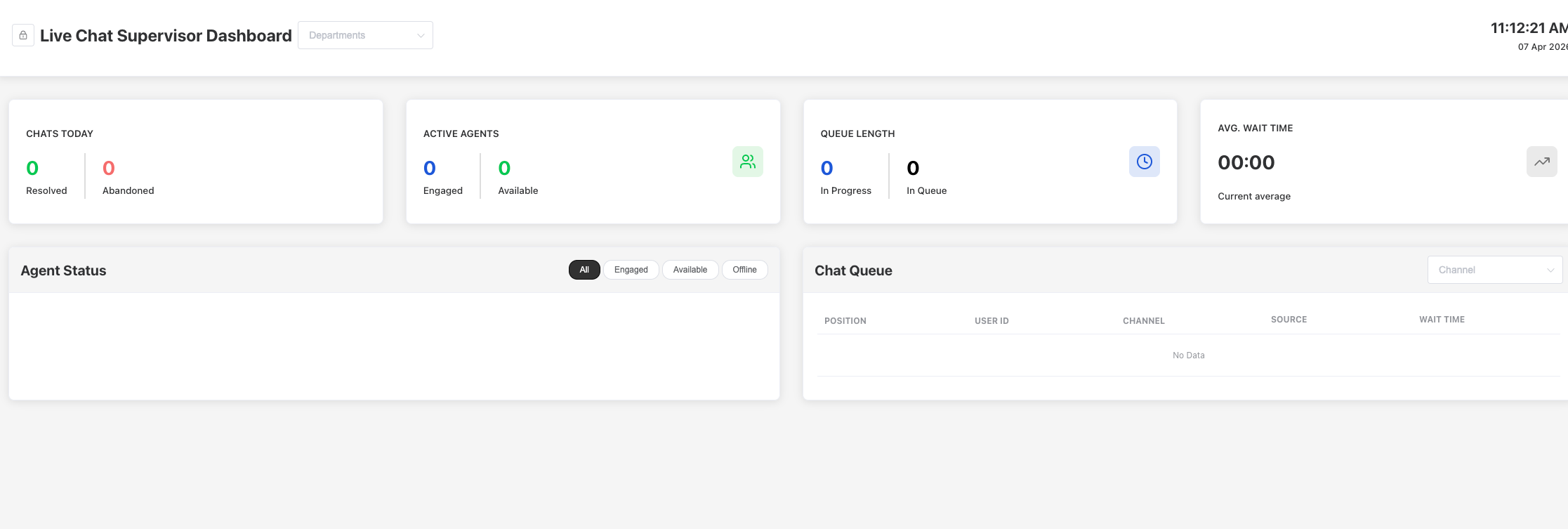
The interface also includes detailed sections such as Agent Status and Chat Queue, allowing supervisors to monitor ongoing conversations, agent availability, and queue positions in real time for better operational oversight.
This feature can be enabled via Settings > Handover > Live Chat Live Analytics, where clients can configure:
- Auto reset timing to define when metrics reset daily
- Wait time thresholds (e.g., amber/red indicators) for monitoring SLA performance
Overall, this enhancement improves real-time decision-making, operational visibility, and queue management efficiency for live chat teams.
Enabled user feedback input after end session in webchat#
#KR-7562, #enhancement, #webchat
Improved the end session experience in webchat by allowing users to provide feedback even after clicking the “End Session” button. Previously, text input was disabled after ending the session despite the “Allow User Input” setting being enabled, preventing users from submitting comments or feedback.
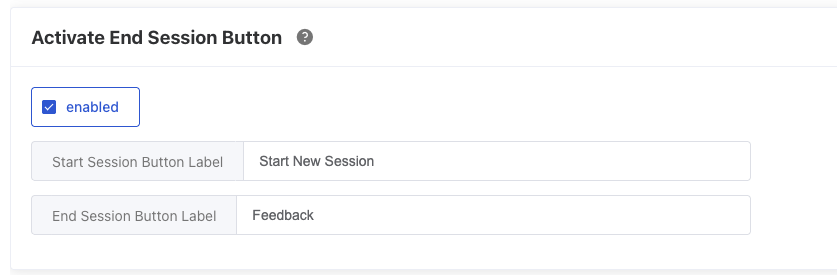
With this enhancement, a new setting has been introduced to allow post-session input, enabling users to share feedback seamlessly after the session ends. This improves feedback collection, enhances user experience, and ensures valuable user insights are not lost.
Enhancement: Improved CPU utilization and stability for multi-instance deployments#
#KR-6680, #enhancement, #system, #performance, #multi-instances
Optimized system performance to better handle high CPU load in multi-instance environments. Previously, the keyreply-task service experienced CPU spikes exceeding 90%, leading to multiple crashes and instability. With this update, CPU usage has been reduced to approximately 40% through performance optimizations.
Additionally, improvements have been introduced to better manage workload distribution and mitigate risks in scenarios where multiple pods are involved, addressing current limitations in handling multi-instance scaling. This enhancement improves system resilience, reduces crash risks, and ensures more stable operation under high load conditions.
Improved Webex notification reliability across multiple browser sessions#
#KR-8355, #enhancement, #webex, #dashboard
Enhanced the Webex integration to ensure more consistent notification delivery when agents are operating across multiple browser sessions (e.g., Webex in one browser and KeyReply dashboard in another). Previously, agents experienced intermittent missing notifications and state inconsistencies due to session desynchronization between Webex, the KeyReply dashboard, and backend agent state.
With this enhancement, improvements have been made to better synchronize agent status between the server and live chat UI, reducing cases where notifications are not triggered. Additional handling has been introduced for scenarios involving relogin, refresh, and multiple concurrent sessions to ensure agent availability state is accurately reflected.
This update improves reliability for agents working in split environments, ensuring they receive timely notifications and can respond to chats without disruption.
Migrated webchat auth refresh from HTTP cookie to token-based authentication#
#enhancement, #authentication, #security
Updated the webchat authentication mechanism by replacing HTTP cookie-based refresh with token-based authentication to support COEP credentialless environments. This change enables webchat to function correctly within cross-origin iframe restrictions where cookies are not supported.
The enhancement includes strengthened security measures such as device registration, token rotation, and rate limiting to ensure secure session management. This improves compatibility, enhances security, and enables seamless deployment of webchat on client-hosted environments without reliance on cookies.
Improved webchat security by removing “unsafe-inline” usage#
#KR-8130, #enhancement, #security, #webchat
Enhanced the security of the webchat widget by removing the use of “unsafe-inline” in its configuration. This aligns the widget with stricter Content Security Policy (CSP) standards, reducing exposure to potential cross-site scripting (XSS) attacks and improving overall security posture for webchat deployments.
Added real-time WhatsApp message delivery tracking and failure alerts#
#KR-6985, #feature, #whatsapp, #message-status
Introduced real-time tracking of WhatsApp message delivery status to provide clients with immediate visibility into message outcomes. Clients can now monitor delivery statuses (e.g., sent, delivered, failed) at the individual message level as they occur, rather than waiting for the full completion of a broadcast or campaign.
This feature also includes the ability to track the number of failed messages within a defined timeframe, along with alert notifications when failures exceed expected thresholds. This enables faster operational response, allowing clients to quickly identify issues, take corrective actions, and trigger resends without manual checks.
The enhancement is particularly valuable for high-volume message blasts, improving monitoring efficiency, reducing delays in issue resolution, and ensuring higher reliability of WhatsApp communication campaigns.
Bug fix#
- [KR-9741] Fixed live chat inactivity message triggering immediately when queue time exceeds inactivity threshold
- [KR-8809] Fixed incorrect Outreach contact data display when columns are hidden
- [KR-9712] Fixed incorrect chat ordering
- [KR-9649] Fixed automation issues in Outreach blasting
- [KR-8410] Fixed missing contact tags during Outreach contact updates
- [KR-9669] Fixed chat widget rendering HTML script content in WhatsApp messages
- [#KR-9522] Fixed issue where the second agent could not see the chat in Supervisor view for shared chats