
Release Notes 34.1.0
Smart Classifier - Advanced AI-Powered Enhancement for the FAQ Module
Release Date: 19 November, 2024
New features
Smart Classifier - Advanced AI-Powered Enhancement for the FAQ Module
KeyReply is excited to introduce the Smart Classifier, an advanced AI-powered enhancement for our FAQ module, designed to significantly improve accuracy and efficiency in intent recognition.
In the past, creating and managing intents in the FAQ module required you to manually input questions and answers. This process involved downloading chat logs, evaluating questions with fallback results, and categorizing them into the correct intents. While this approach worked, it often required considerable effort, especially when questions were unclear, phrased differently, or failed to match the existing intent structure. In such cases, recognizing the correct intent was a challenge, and frequent manual updates were needed to improve bot accuracy.
With the introduction of Smart Classifier, we’ve streamlined and enhanced this process. Now, instead of manually categorizing questions, you can create new intents by simply providing the intent name and a description. This description serves as a guide for the AI to better understand and categorize incoming questions, improving the bot’s ability to recognize and handle a wider variety of inquiries accurately.
In situations where the FAQ module is uncertain about an intent—perhaps due to unclear phrasing or insufficient data—the question will automatically be forwarded to the Smart Classifier for further analysis. This ensures that even if the FAQ system can’t initially recognize a question, the Smart Classifier can handle it more accurately, improving the overall response quality and reducing the need for constant manual intervention.
With Smart Classifier, the FAQ module becomes smarter, more intuitive, and more reliable, providing a better experience for your end users. They will benefit from quicker, more accurate responses to their support inquiries.
To start using the Smart Classifier feature, please reach out to us at [[email protected]](mailto:[email protected]). Let us help you elevate your bot’s performance and provide an enhanced user experience!
Enhancement
GenAI
GenAI Integration with Facebook Messenger
In KeyReply version 3, we introduced GenAI, a groundbreaking feature that leverages advanced AI models and Large Language Models (LLMs) to create more intelligent, adaptable, and efficient virtual assistants. Previously, GenAI was integrated with our webchat widget and WhatsApp. With this latest enhancement, GenAI now extends its capabilities to Facebook Messenger, enabling seamless message exchange between your virtual assistant and users on this platform.
Key Features:
• Enhanced Communication: GenAI can now send and receive messages via Facebook Messenger, broadening your virtual assistant’s reach.
• Advanced AI Integration: Utilizing state-of-the-art AI models, GenAI provides more accurate and context-aware responses.
• Seamless User Experience: Users can interact with your virtual assistant directly through Facebook Messenger, ensuring a consistent and efficient support experience.
This integration allows you to engage with your audience on one of the most popular messaging platforms, enhancing customer satisfaction and operational efficiency.
GenAI with New UI - Improved User Experience
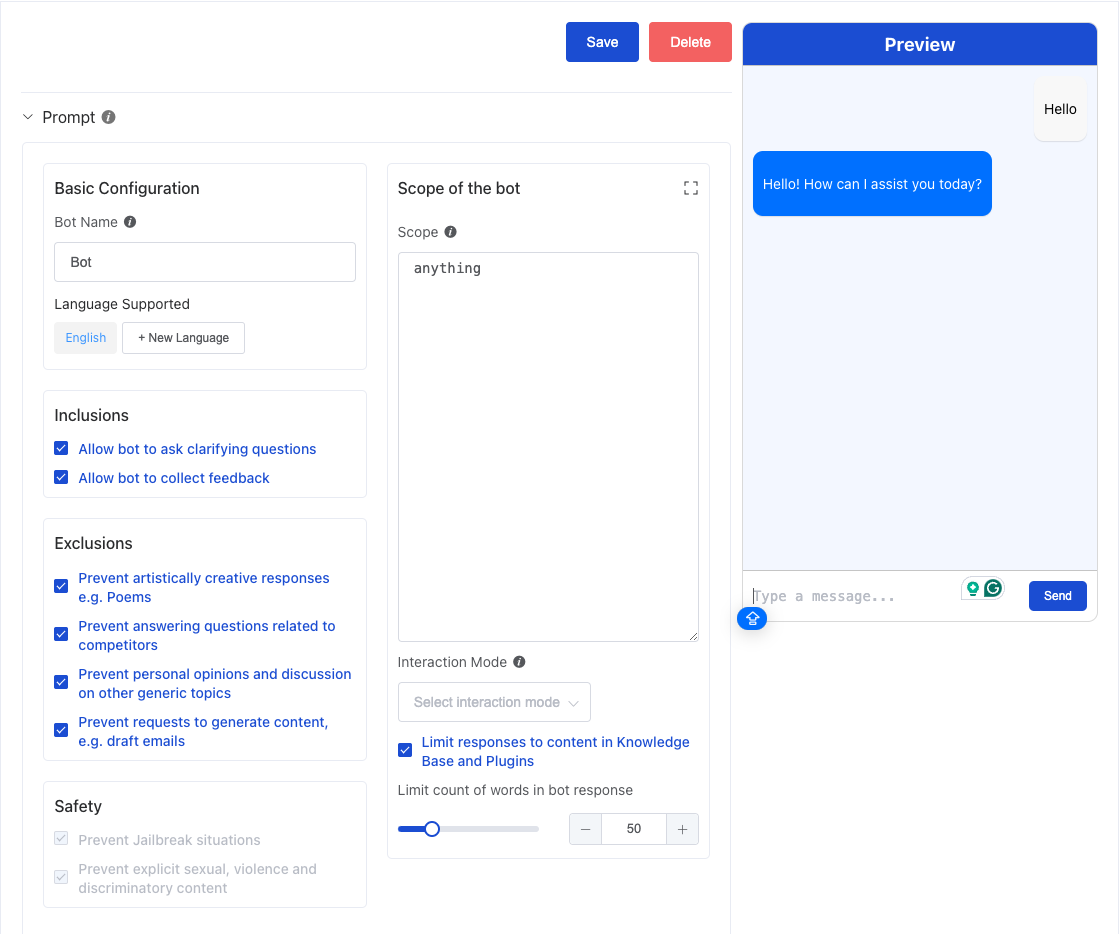
In the first launch of the new GenAI feature, we listened to feedback from our customers and made significant improvements to the user interface (UI). This update makes it clearer and easier to use, providing a more streamlined experience. The new UI is now separated into the following parts:
- Prompts: The prompt that defines the chatbot’s persona.
- Connect to Knowledge Base: Connect to a knowledge base to provide more accurate responses.
- Actions: Actions to be performed before and after the bot’s response.
- Plugins: Manage and configure plugins to extend the bot’s functionality. Enable, disable, or customize tools for a more dynamic and versatile experience.
- Advanced Settings: Adjust the bot’s behavior and preferences for a more tailored experience.
This new UI aims to simplify your workflow while maintaining powerful functionality for managing and optimizing your GenAI virtual assistant
Save WhatsApp Template Message to Chat Interaction
| ID | 86eqb9mqk |
| ---| --- |
| Category | Dashboard, WhatsApp |
| Type | Enhancements |
Sending WhatsApp templates is a powerful feature within our system, enabling you to easily connect with customers. WhatsApp templates help you send predefined messages to a list of end users, making marketing outreach more efficient and streamlined.
With this new enhancement, we now allow you to save WhatsApp templates sent into the chat history. This means that agents can later review the sent messages in the Monitor tab under chat history, ensuring better tracking and follow-up.
In Bulk Send, you can also check the options to Store Text Interaction, which allows you to store text-based messages in the chat history, or Store Media Interaction, which enables you to save media (e.g., images, videos) sent via WhatsApp templates in the chat history as well.
This enhancement improves your ability to track and manage interactions, ensuring that all communications are easily accessible for agents to review and respond accordingly.
Setting/System
Update UI for Setting Tab
| ID | 86eqgmg34 |
| ---| --- |
| Category | Dashboard, Setting |
| Type | Enhancements |
| | |
In this release, we’ve introduced a new and improved UI for the Settings Tab to enhance your experience and streamline configurations. We’ve categorized the settings into distinct groups for easier navigation:
• Channel: This section allows you to configure the channels through which chat messages can be integrated with KeyReply.
• Integrations: Here, you can integrate the KeyReply dashboard with third-party systems to extend its functionality and support your existing infrastructure.
• Modules: This area provides configuration options for all the modules available in KeyReply, allowing you to customize each module’s settings.
• System: Contains core system configurations, allowing you to manage fundamental settings that govern KeyReply’s operation.
• Security: This section focuses on the security configurations for your system, including access control and other essential security settings.
With these new updates, managing and configuring KeyReply is now more intuitive and organized, giving you greater control over your system settings.
Update Facebook Developer Apps Graph API
| ID | 86eqgmg34 |
| ---| --- |
| Category | Dashboard, Setting, Facebook |
| Type | Enhancements |
In response to the latest updates to Facebook’s Developer Apps Graph API, we have upgraded our system to support the new API version 20. This ensures compatibility with the latest features and improvements provided by Facebook, offering enhanced performance and functionality for your integrations.
[https://developers.facebook.com/docs/graph-api/changelog](https://developers.facebook.com/docs/graph-api/changelog)
Bug fix
Live Chat
- [#86eqd6h5z] Count of online agents is incorrect when multiple agents log in at the same time.
- [#86eqbh6d5] Live chat queue not updating.
- [#86eq5e4j5] Fix slow loading on the monitor chat page.
- [#86epuhjtm] Live chat rating captured on weekends (Prevent post-login users from intermittently not getting a new session when the conversation starts).
- [#86eq6kbvt] Add a handler for duplicated message IDs in the request body.
- [#86eqae8wg] Incorrect staff name showing in the live chat tab for resolved chats
- [#86eqetzqq] Fix the error when fetching user information for clone users
- [#86eq85twu] Fix the request body of the API remains the same when moving from one API to another with the same config
- [#86eqgxpjc] Fix so escalated live chat is visible without needing a page refresh
- [#86eqfrp1y] The Bot launcher icon and logo not appear on the client website.
- [#86eqknt4e] Manual pull of escalated chat not reflected before page refresh.
- [#86eqfdnpc] Fix the issue where the form with a file cannot be submitted.
- [#86eqhy3wf] “Payment Mode Type” info not showing in VA conversation three times (Fix glossary search variable not capturing properly).
- [#86eqec5k5] Not able to see documents from agent to user
Supervisor
- [#86eq404ah] User ID appearing twice on Supervisor Console