
Release Notes 34.5.1
Character Limit for Knowledge Base Articles
Release Date: 03 June, 2025
New features and enhancements
Character Limit for Knowledge Base Articles
_#86et5rheb, #enhancement_
_#genai, #knowledge-base, #article_
To improve the efficiency of managing content in the Knowledge Base, we’ve introduced a 200,000 character limit for articles. This update ensures that the content is more manageable for both training GenAI and editing purposes. By limiting the size, we help streamline the process, making it easier to handle large amounts of information while maintaining optimal performance for both the system and users.
Prevent Auto Trigger of Website Re-Scrape and Add Manual “Re-Scrape” Button
_#86et7hzy5, #enhancement_
_#genai, #knowledge-base, #website_
Previously, when editing tags for a website in the Knowledge Base, the system would automatically trigger a re-scrape of the website content. This sometimes led to unintended content updates when clients only wanted to modify tags. With this enhancement, we have removed the auto-trigger for re-scraping when changing tags. Instead, we’ve introduced a new “Re-Scrape” button, allowing clients to manually trigger the re-scrape of website content when needed. This gives clients more control over when content updates occur.
Integration of WhatsApp Flows into KeyReply for Customizable Business Interactions
_#86ep0nk83, #new-feature_
_#whatsapp_
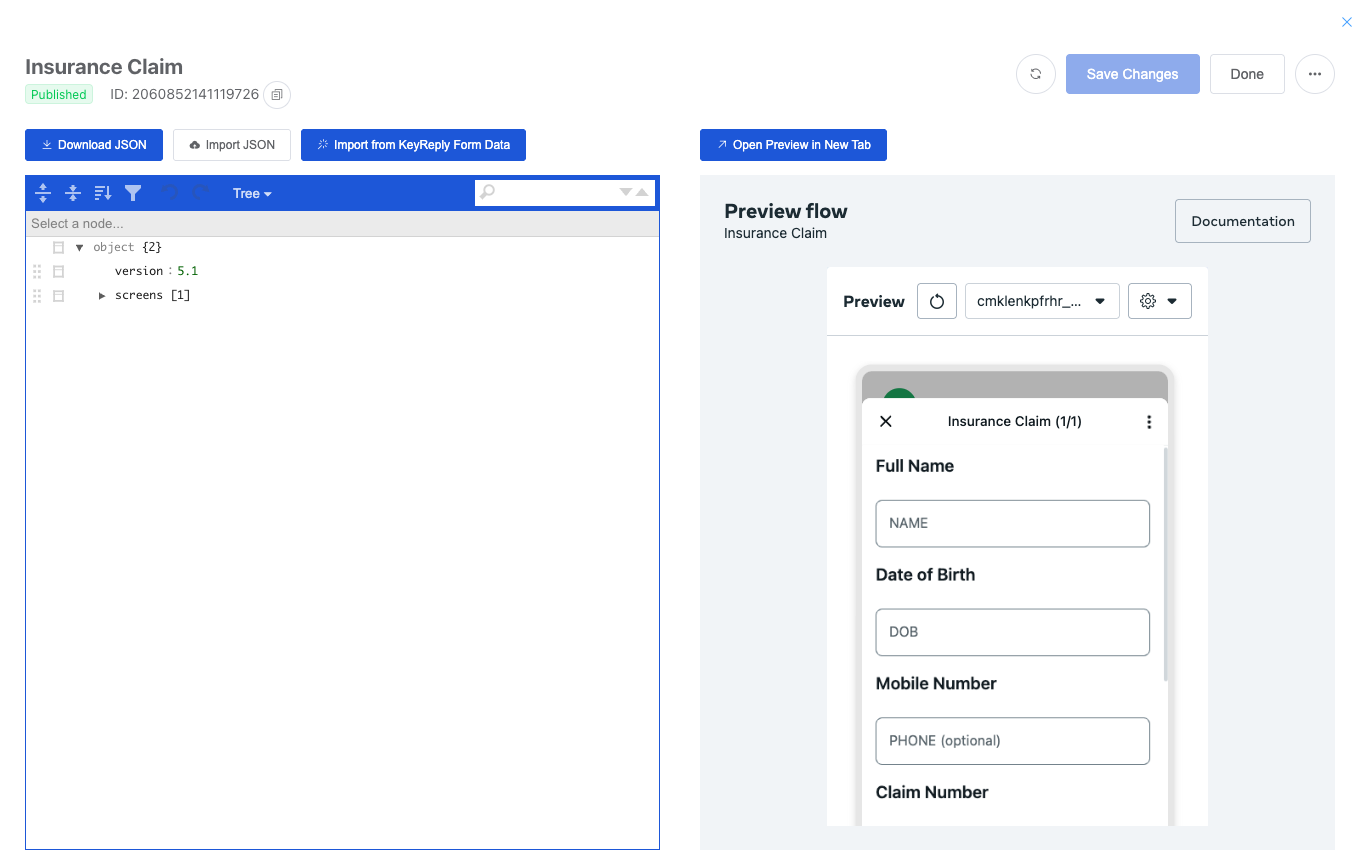
KeyReply is excited to introduce the WhatsApp Flow integration, allowing businesses to create and customize structured interactions on WhatsApp for a more efficient customer communication experience. With WhatsApp Flows, businesses can design tailored workflows for various use cases such as appointment booking, feedback collection, and lead generation. This powerful feature enables businesses to engage with customers in a more organized way, offering a seamless, automated experience.
By using WhatsApp Flows, businesses can easily define, configure, and personalize the messaging process with rich interactions, helping to drive sales, enhance customer support, and streamline operations. Whether you’re capturing new leads, recommending products, or handling customer queries, WhatsApp Flows offers a structured and engaging way to communicate that aligns with your customers’ preferences.
For more information, please contact our Customer Success and Project Manager (CSPM) or reach out to us at [[email protected]](mailto:[email protected]).
The official [WhatsApp Flows Documentation](https://developers.facebook.com/docs/whatsapp/flows).
Update Default Persona to Use Azure OpenAI Model
_#86et667xr, #enhancement_
_#genai, #persona_
In this update, we have enhanced the persona creation process by making Azure OpenAI the default model for new personas. Previously, the default model used was OpenAI directly. With this change, when a new persona is created in KeyReply, it will automatically be configured to use Azure OpenAI, ensuring more seamless integration with Microsoft’s AI services and improved performance for your virtual assistant. This update simplifies the setup process and enhances the flexibility of our AI model integrations.
Add a button display mode feature to control button visibility in webchat
_#86eqz9xvb #new-feature_
_#editor, #contentnode, #webchat_
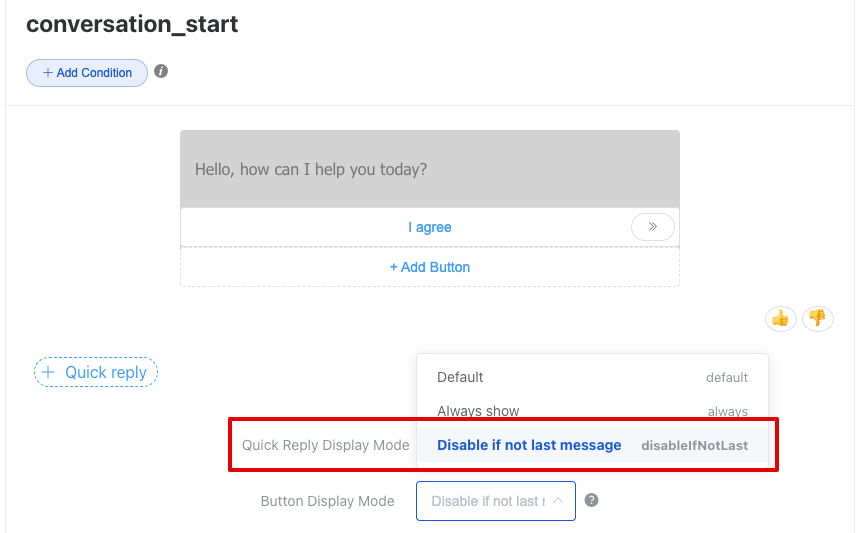
In this new enhancement, we allow you to configure specific buttons in the chat widget to be hidden after the user clicks them, providing a more refined and personalized experience. Previously, all Quick Reply buttons would disappear after a click, but now, you can configure individual buttons to hide after they are clicked, leaving others visible for further interaction. This functionality is available in the Editor/Content Node under the Button Display Mode, where you can enable the option to Disable if not the last message, ensuring better control over the button display logic and optimizing the user experience.
Add “Read More” to View Full Bot Response
_#86ermj2kd, #new-feature_
_#webchat_
To enhance the user experience, KeyReply has introduced a new feature to handle long or interlinked bot responses. Instead of displaying lengthy messages in their entirety, the message will be truncated with a “Read More” button. When users click on “Read More”, they will be able to view the full content of the message without it disrupting the flow of the conversation or causing users to scroll excessively. This improvement makes it easier for users to review previous messages and engage with the conversation in a more organized manner.
Bug fix
- [#86et7hg56] Live chat staff unable to see chats on UI
- [#86ery2kby] Livechat staff unable to see ongoing chats
- [#86et5qrfx] Live Agent Status reflected incorrectly with the cache
- [#86errdbrk] Searching chat history with Facebook source is not working correctly
- [#86etfxbzf] Fix module save bug when editing long text